

Can My Employees Put Customer Information into ChatGPT and other AI Tools?
Your employee has a customer email to respond to. They copy and pasted it into an AI tool, asked it to draft a reply to save time and work more efficiently.
Do you think this is a great use of AI or is it a privacy problem you didn’t know you had?
Think of this for a moment.
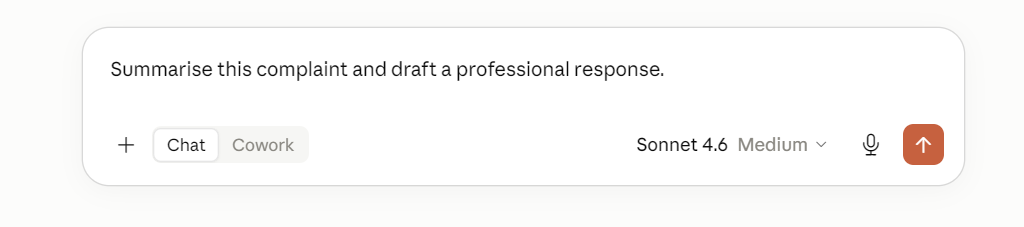
One of your customers sends a long email to one of your employees. The email includes their full name, contact details, account information, and an explanation of a problem they are having with your business. Your employee needs to respond so instead of spending 30 minutes drafting something from scratch, they open ChatGPT or another AI assistant and prompt it by typing:
‘Summarise this complaint and draft a professional response’.
Seconds later, they have a good starting point so they check it, make a few changes, send the response to the customer and move on.
From the employee’s point of view, they’ve done exactly what businesses are being encouraged to do with AI….to work more efficiently and for some business policies encouraged to use AI.
But, something else has happened here which is the employee has copied the entire set of customer information into an AI system. Was that AI system approved by the business? Even if it was approved, was it approved for this particular use and for this type of customer information?
So, Can Employees Put Customer Information into AI?
Potentially, but not simply because an AI tool has been approved by the business.
Before customer information, or any personal information or sensitive information is entered into an AI system, the business needs to understand whether the AI tool is approved to handle that type of information, whether that particular use has been approved, and whether using the information in this way is consistent with the organisation’s privacy, information-sharing and other obligations.
If an AI tool hasn’t been approved to handle customer information, or any personal information or sensitive information, employees shouldn’t be putting that information into the AI tool. Even when an AI tool has been approved, that doesn’t mean it’s approved for every type of information or every use.
The Employee isn’t Necessarily the Problem
It is so easy to look at this situation and say “The employee shouldn’t have done that”. But I would look at it differently.
Did the business tell them they couldn’t?
Did the employee know which AI tools were approved?
Did anyone explain or provide training on what information they could and couldn’t put into AI?
Does the business have appropriate policies in place covering the use of AI tools?
Does the business have appropriate AI governance in place to support the use of AI tools in the organisation?
Has the business actually assessed the AI system?
Or has the employee simple been told to use AI, become more productive and respond to customers quickly?
If a business encourages employees to use AI but doesn’t give them clear guidance around how to use it, it’s leaving individual employees to make those decisions themselves. This then becomes an AI governance and privacy issue, rather than an employee issue, and businesses may not even realise it.
Approved AI Doesn’t Mean Approved for Everything
Your business may have approved an AI tool. That doesn’t necessarily mean employees can use it for everything. For example, you might approve an AI assistant for:
summarising non-confidential information;
drafting marketing content;
improving generic writing; or
brainstorming ideas.
That doesn’t automatically mean the business has approved it for accessing information such as:
customer, employee or job candidate information;
contracts like vendor contracts or employment contracts;
sensitive personal information such as employee or customer health information including dietary requirements or disability support;
confidential client information;
commercially sensitive information; or
financial information.
So there are three simple questions an employee should be able to answer:
Is this AI tool approved?
Is what I’m using it for approved?
Is this information approved for that use?
If employees don’t know the answer, they shouldn’t have to guess.
What about Unapproved AI?
There is another situation most businesses haven’t thought about and need to consider, and that is employees using AI tools the organisation hasn’t approved. This is often referred to as shadow AI.
It might be a personal AI account, a free online tool, a browser extension, an AI meeting assistant or another AI application an employee has discovered themselves. In many cases, employees aren’t necessarily deliberately ignoring company rules. Often, they’re simply trying to get their work done more efficiently or approved AI tools lack the capability needed to help to complete their work, hence they opt for a personal account.
Think back to the employee in the example noted at the beginning. They have a customer waiting for a response and there may be a company policy requirement to respond that day and several other priorities demanding their attention. They discover that an AI tool can save them 30 minutes, so from their perspective it solves a problem. However, from the business’ perspective, there is another question: What information are we permitting an unapproved AI tool to handle? This is why telling employees to “use AI responsibly” isn’t enough. They need to be informed what responsible use actually means.
What Can You Do in Your Business?
You do not necessarily need to ban AI or build a huge governance framework from the start. Start with a simple question for your employees:
“Show me how you’re using AI to do your job.”
Then look at:
which AI tools they’re using
whether those tools have been approved through an approval process
what they’re using them for
what information they’re putting into them
whether your existing policies cover those situations
whether employees actually know what to do when they are unsure
From there, you can establish which AI tools are approved, what they’re approved for and what information employees can use with them. Most importantly, don’t just tell employees to “use AI responsibly” or “use AI to be more efficient”. Give them regular training, not just a once off session, have group discussions, provide examples of situations they actually recognise, encourage them to reach out if they are ever in doubt about the use of an AI tool and what information is permitted for input into that tool. Ask them “Can this information go into our approved AI tool?”. All of this is much more useful than just telling employees to “use AI responsibly”, etc.
An AI Usage Policy Helps
An AI Usage Policy should answer the everyday questions employees encounter when using AI for their work. It shouldn’t require an employee to understand AI regulations or conduct a vendor risk assessment before deciding whether they can use a tool. The aim of the policy is to help make the boundaries clear.
For example:
which AI tools are approved for work
what those tools can be used for
whether personal or free AI accounts can be used
what information can and cannot be entered
when approval is required
when AI-generated output needs to be checked
what to do if information is accidentally entered into an unapproved AI tool
who to ask when they’re unsure
But Your AI Usage Policy Shouldn’t Sit on its Own
First, look at what policies you have in place (if any) and safeguards or settings configured for approved AI tools, including existing software that has AI features.
Consider the following:
If you haven’t already, establish an Information Sharing Policy outlining what information can be shared and under what circumstances.
Review your privacy notices and procedures to determine whether they accurately explain how personal information is collected, used, disclosed and processed when AI is involved. Don't forget recruitment privacy notices if AI is being used to process job candidate information.
Vendor-management process or procurement procedures should require systems to be assessed before any business information is put into them.
An Acceptable Use Policy should be established to govern technology employees are allowed to use.
An Information Security Policy should also be established to govern approved systems and how business information is protected.
Review on an annual basis safeguards have been configured approprately for your business and align with your policies and procedures.
Download an AI policy template? That’s only the starting point
One of the first things most businesses might do when they realise it needs some boundaries around AI is start search online for an AI policy template or perhaps someone opens and AI tool and prompts with the following:
“Write an AI Usage Policy for my business”.
A few minutes later, you have a professional looking policy. There’s nothing necessarily wrong with this approach. A template can give you a useful starting structure. But from experience, it will not reflect what’s actually happening inside your business unless you tell the AI this information first. There are other things to consider such as the AI tool approval process, privacy obligations such as the EU/UK GDPR, EU AI ACT, Australian Privacy Principles (APPs), or New Zealand Information Privacy Principles (IPPs). Therefore, it is really important your AI Usage Policy reflects not only privacy obligations but how your business actually uses AI. A useful AI Usage Policy needs to be clearly understood.
Privacy Laws Still Apply When Your Employees Puts Information into AI Tools
If information being entered into an AI tool contains personal information about a customer, employee or another individual, your existing privacy obligations still apply when AI is used. Depending on where your business operates and whose information you are handling, this could include for example UK or EU GDPR, New Zealand’s Information Privacy Principles, and the Australian Privacy Principles.
So before putting personal information into an AI tool, don’t only ask whether the tool is approved. Consider whether your business is permitted to use the personal information in this way and whether the AI actually needs all of that information to complete the tasks, including prompts given by your employees.
Remember These Three Questions
Going back to the employee trying to answer the customer’s email before the end of the day. They weren’t trying to create a privacy problem. They were trying to follow company rules, serve the customer and work efficiently.
Good AI governance should allow them to do those things without requiring them to make privacy and governance decisions on behalf of the business. Before any of your employees put business information into AI, they should be able to answer:
Is this AI tool approved?
Is what I’m using it for approved?
Is this information approved for that use?
If the answer to any of those questions is “I don’t know” they should know exactly who to ask. It is important to provide your team with clear boundaries so they can use AI appropriately, but those boundaries shouldn’t stop people from questioning whether the approved tool is actually working for them.
Sometimes the Right Solution Isn’t AI
If an approved AI tool isn’t solving the problem, encourage employees to raise it rather than finding and using an unapproved AI tool themselves. Go back to the problem your’re trying to solve. There may be a better tool, a better process, or a different solution altogether, and sometimes, the best solution may not involve AI at all.
